Every November the same little tags show up: “Was $119.99, now $79.99!” Sometimes that’s a real gift from the store. Sometimes the “was” price only existed for a week or two, just long enough to make the sale look big.
You don’t have to guess. With a few free tools and about two minutes per item, you can see what something has really cost, and decide calmly. Here are five checks for Black Friday (November 27 this year) and the rest of the season.
1. Know what the “was” price is supposed to mean
The Federal Trade Commission has a short rule on this, the Guides Against Deceptive Pricing, 16 CFR 233.1. It says a former price is fair to compare against when it was “the actual, bona fide price at which the article was offered to the public on a regular basis for a reasonably substantial period of time.”
The FTC even gives an example. A shop sells a fountain pen for $7.50. It raises the price to $10 for a few days, knowing hardly anyone will buy at that price, then “cuts” it back to $7.50 and advertises “Were $10, Now Only $7.50!” The FTC calls that a false bargain, because $7.50 was simply the normal price all along.
What this means for you: a crossed-out price is a claim, not a fact. Nobody checks every price tag in December, so check it yourself.
2. Look up the price history (it’s free)
This step does most of the work. A price-history chart shows what an item actually cost, day by day.
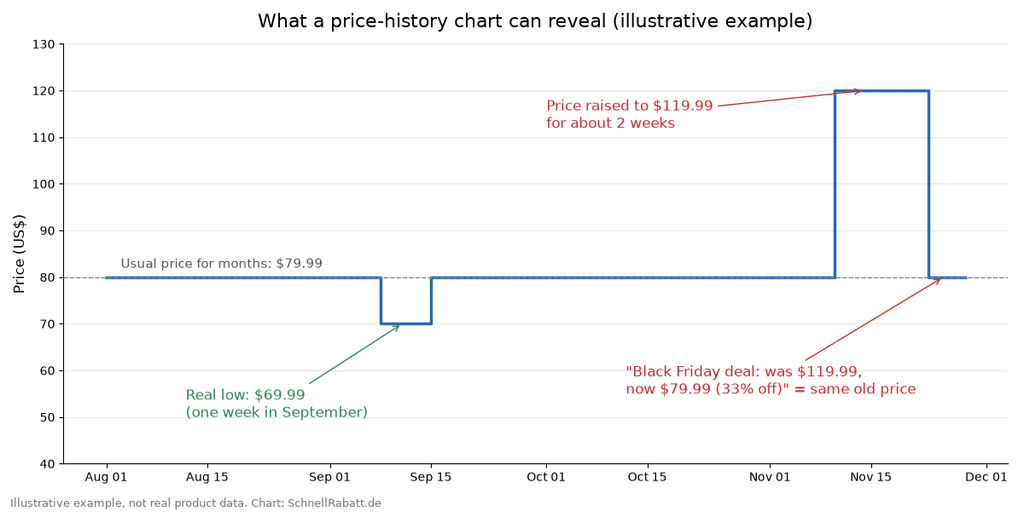
Illustrative example (not real product data): a ‘was $119.99, now $79.99’ deal that is really the usual price. Chart: SchnellRabatt.de
Alt text: Line chart of an illustrative slow cooker price: $79.99 for months, a one-week low of $69.99 in September, a jump to $119.99 for two weeks in November, then a ‘Black Friday deal’ back at the usual $79.99.
- camelcamelcamel (camelcamelcamel.com) tracks Amazon prices. Paste the Amazon product link into its search bar and you get a chart going back months or years. You can set an email alert for a price you choose, and you can even import a public Amazon wish list in one go. It’s free.
- Keepa (keepa.com) does the same for Amazon, with a browser extension that puts the price chart right on the Amazon product page. The free account includes the charts and price-drop alerts; the paid plan is aimed at sellers and you don’t need it.
- Google Chrome’s Shopping Insights works for many stores, not only Amazon. In Chrome on a computer, open the product page and click the Shopping Insights icon in the address bar. A side panel shows the price history and the usual price range across the web, and you can turn on price tracking to get an email when the price drops. You need to be signed in to Chrome with sync on (Google’s help page has the steps).
- PayPal Honey’s Droplist is another free option. Add an item to your Droplist and Honey alerts you when the price drops below the amount you choose. Not every store is supported.
How to read the chart: look at the price the item sat at most of the time, and at its lowest price in the last three to six months. If the “sale” price is the same as the price it has had for months, it isn’t a deal; it’s just a normal week. If the price jumped up shortly before the sale, like in the example above, you’re looking at the pen trick from point 1.
3. Decide your “good price” before the sale starts
Sales work on our feelings: a countdown clock, “only 3 left,” a big red percentage. Decide what you’re willing to pay while you’re still calm.
Start a holiday wish list now (a notebook page works fine). For each item, write down:
- The usual price from the price-history chart
- The lowest price it has had in the last few months
- Your own “buy” price, usually at or just above that low
Example: a slow cooker has sat at $79.99 for months and dropped to $69.99 for a week in September. Your buy price might be $70. If Black Friday brings it to $79.99 with a “33% off” sticker, you’ll know to wait. If it hits $69.99 or less, you can buy with a clear conscience.
And one question for every item: was I planning to buy this before I saw the sale? If not, the cheapest price is the one you don’t pay.
4. Compare the exact same item, not just the same name
Check the model number (in the product details or on the box), the size, and what’s included. A TV, vacuum, or kitchen gadget can come in several versions with very similar names, and a “doorbuster” may have fewer features than the one you looked at in October. Search that exact model number to see what other stores charge, and count shipping and members-only conditions.
5. Buy early and let the return window protect you
Holiday return windows are a frugal shopper’s quiet friend. Find a fair price early, buy, keep watching, and return it if a genuinely better price comes along (or the gift misses the mark). Always check the return-by date on your order. Here’s what the big three had announced as of late October 2026:
- Amazon: In a notice to sellers dated October 16, 2026, Amazon said most items bought on Amazon.com between November 1 and December 31, 2026 can be returned until January 31, 2027. Apple products have an earlier cut-off: January 15, 2027. That matches last year’s holiday policy; the normal window is 30 days.
- Walmart: Most items bought in-store or online from October 1 through December 31, 2026 can be returned until January 31, 2027 (Walmart Marketplace notice, August 31, 2026). Exceptions include wireless phones, protection plans, major appliances, Dyson products, food and beverages, and some seasonal and luxury items. Marketplace sellers may differ.
- Target: As of late October, Target had not yet published its 2026 holiday dates. Last year, electronics, entertainment, and most Target Plus items bought November 1 to December 24, 2025 could be returned until January 24, 2026, and Apple, Beats, and mobile phones until January 8, 2026. For most other new, unopened items, Target’s standard 90-day return policy already covers the holidays.
Keep receipts or order emails in one folder, and note each return-by date on your wish list.
Your printable sale checklist
Print this and tuck it in your purse or next to the computer:
☐ Was I planning to buy this before the sale?
☐ What was the price most of the last three months? (Check camelcamelcamel, Keepa, or Chrome’s Shopping Insights.)
☐ Did the price jump up shortly before the “sale”?
☐ Is the sale price at or below my own “good price”?
☐ Same model number, size, and contents as the one I compared?
☐ Shipping, membership, or extra costs included?
☐ What is the return-by date, and is my receipt saved?
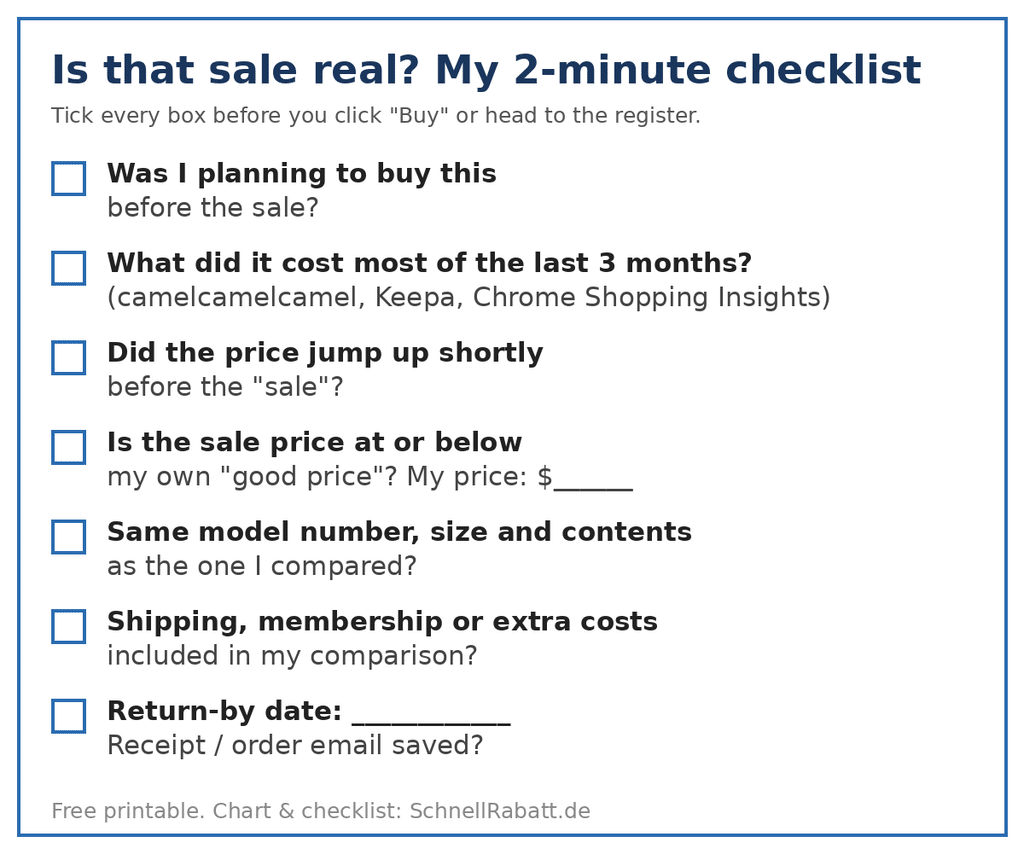
Free printable checklist. Image: SchnellRabatt.de
Alt text: Printable checklist titled ‘Is that sale real? My 2-minute checklist’ with seven tick boxes: planned purchase, 3-month price, price jump before the sale, own good price, same model, extra costs, return-by date and receipt.
A real bargain still looks like a bargain after a two-minute check. The fake ones don’t, and that money stays in your pocket for the things that matter, like the grandkids’ stockings.
About the author: Julia writes for SchnellRabatt.de, a German coupon and savings site that helps shoppers find real discounts and avoid fake ones. She likes turning price rules and return policies into simple checklists anyone can use.
Author Profile

- Lisa has been blogging since 2013, and loves sharing resources and ideas for living a simple life. To get free printables, bonus words, and more - sign up for the newsletter.
Latest entries
 FinancesOctober 23, 2026Is That Holiday Sale Real? 5 Ways to Check a Discount Before You Buy
 Coupon CodeOctober 19, 2026Are You Planning For Christmas?
 GiveawaysOctober 16, 2026Silly Pumpkins Giveaway Hop
 GiveawaysOctober 13, 2026Bevel & Bond End Grain Maple Cutting Board Giveaway
Want to get all the Bonus Words? Subscribe to our newsletter!